1. Calibrate
Sit upright for ten seconds. Pelion saves that pose as your personal baseline instead of assuming one textbook-perfect posture.
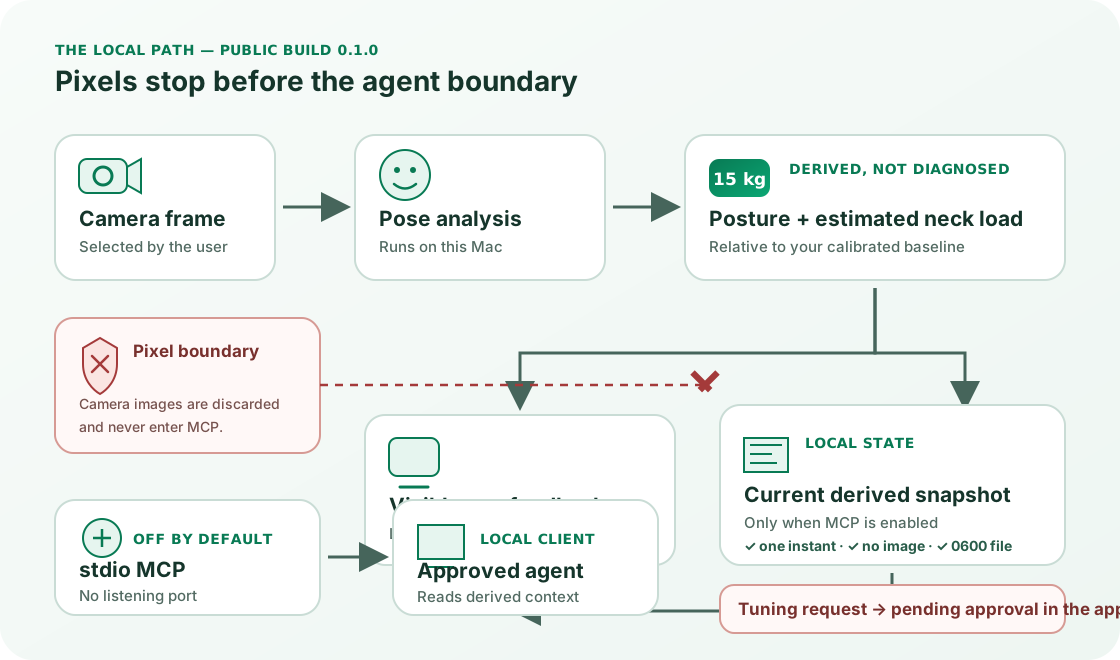
Pelion reads camera frames in memory on your Mac.
It derives posture angles and a relative estimated neck-load signal.
Each frame is then discarded. The estimate is not a diagnosis.
Optional local MCP exposes approved derived numbers to clients.
Camera pixels never cross that boundary.

Sit upright for ten seconds. Pelion saves that pose as your personal baseline instead of assuming one textbook-perfect posture.
The camera frame is analysed in memory on your Mac. Pelion derives angles and an estimated neck-load signal, then discards the frame.
The visible signal changes relative to your baseline. Use the direction and trend as feedback—not as a diagnosis or a direct force measurement.
The diagram separates the app's visual input from the derived numbers that can be written locally. It also separates visible product feedback from MCP: ordinary posture monitoring does not require MCP, and MCP is off by default.
Pelion observes a camera-derived angle relative to the upright posture you calibrated. It then interpolates a load estimate from the angle values published by Hansraj (2014). The angle is an observation; the load is a model output. Neither tells Pelion why you are in that position or whether it causes pain.
| Signal | What it is | Important limit |
|---|---|---|
| Forward tilt | Degrees from your calibrated upright baseline | A camera-derived angle; accuracy depends on a visible side view and confidence gating. |
| Estimated neck load | A relative kilogram estimate | Interpolated from the Hansraj (2014) angle-to-load model; not measured by a force sensor. |
| Confidence | Model confidence for the current derived reading | Low-confidence inputs are gated rather than presented as equally reliable. |
| Today summary | Local monitored time, healthy percentage, peak and nudges | Aggregated numbers stored on the Mac; no camera frames are retained. |
See the interactive neck-load model and its research limitations. If you have persistent pain, weakness, numbness, balance changes or another worrying symptom, use appropriate clinical care rather than a posture app to investigate it.
On one Apple M5 Mac, five isolated repetitions completed with 0 failures across 25 fresh MCP processes. A current derived snapshot read had a 0.761 ms median and a 0.672–2.497 ms full observed range. These local timings do not generalize to every Mac.
Mac17,2 · Apple M5 · 32 GiB · macOS 26.5.2 (25F84)
5 pre-registered repetitions; fresh process for enabled, absent, disabled, stale and quit states; full range retained.
Maximum MCP-process socket count observed: 0. Timed on 2026-07-29.
| Measured event | Median | Full observed range |
|---|---|---|
| Process start to initialize response | 16.186 ms median | 16.066–855.288 ms full observed range |
| Current derived snapshot read | 0.761 ms median | 0.672–2.497 ms full observed range |
| Today summary read | 0.191 ms median | 0.151–0.616 ms full observed range |
| Tuning request to pending response | 0.416 ms median | 0.354–1.089 ms full observed range |
Download the complete normalized JSON dataset or CSV table. The fixed protocol SHA-256 is 22db7d94578f8eaeac684eeeeaa1f2861592a850cdf7d4cbb66efb806c467da1. All failures would remain in the result; there were none.
MCP is disabled until you turn it on. When enabled, the app rewrites one private local snapshot at most once a second. The bundled server reads that derived snapshot and responds to the client process over stdio. It does not receive a camera buffer.
{
  "state": "watch",
  "neck_load_kg": 15.2,
  "neck_load_display": "15 kg",
  "forward_tilt_deg": 23,
  "confidence": 0.94,
  "updated_at": "<synthetic timestamp>"
}| Boundary | Current fact | Detail |
|---|---|---|
| Resources | 7 local resources | Current posture, today, fatigue, settings, derived frame, date buckets and config. |
| Readable data | Derived numbers and local summaries | No camera image, video stream, raw pixel buffer or remote history service. |
| Transport | stdio | The client launches the executable. There is no listening network port. |
| Tuning changes | Pending user approval | A request appears in the app; the MCP server does not silently apply it. |
| Public binary | Apple Silicon and Intel | The app and bundled MCP executable in version 0.1.1 both support Apple Silicon and Intel. |
Use the MCP setup guide and complete resource/tool contract for client configuration and availability details.
The app's camera processing, website demo and optional MCP snapshot are separate boundaries. The Mac app also sends anonymous usage analytics by default unless you opt out; those events do not include images.
Read the complete privacy lifecycle →The controlled experiment measured local MCP response boundaries against synthetic snapshots from the public signed artifact. It checked state handling, approval behavior and socket count.
No camera latency, CPU, memory, posture-model accuracy or clinical outcome was measured. One M5 Mac and five repetitions are not a benchmark for every machine.
Download without an account or daily monitoring limit. Then inspect the exact pricing, privacy, MCP, neck-load method and publisher facts behind the product.